Perfecto 26.2 (released on March 1, 2026) introduces Perfecto Connect support for virtual and web devices in AI Scriptless, simpler scheduled‑job controls, and faster device selection with new filtering and sorting in Manual Testing. Repository downloads will switch to an opt‑in model on April 1, 2026, improving data security. This release also adds a new API to export Scriptless tests as Appium JavaScript, Quantum 3.1.9 with key security and configuration updates, expanded iOS, Android, macOS, and emulator support, and updated Chrome, Firefox, and Edge versions, along with notices for Android 8/9 EOL and the extended Appium 1 deprecation timeline.
On this page:
AI Scriptless enhancements
In this release, AI Scriptless includes the following enhancements.
Perfecto Connect support
AI Scriptless now supports using Perfecto Connect with virtual devices (simulators) and web devices, in addition to real mobile devices. This allows you to test intranet‑only applications without adding attach or detach commands. The active Perfecto Connect tunnel is applied automatically.
To learn more about running Perfecto Connect from AI Scriptless, see Associate a device with a Perfecto Connect tunnel.
Scheduler updates
When working with scheduled jobs, you can now do the following :
-
Refresh the list of scheduled jobs when viewing all scheduled jobs to ensure the list is fully up to date. For more information, see View scheduled jobs.
-
Disable Recurrence when creating a new scheduled job. The default recurrence is Once. A job with the recurrence set to Once does not appear in the list of scheduled jobs after it runs. Disable Recurrence to create a job that does not run automatically, so you can search for, edit, and view the job in the list of scheduled jobs. For more information, Recurrence and cron expressions and Create a scheduled job.
Manual Testing enhancements
This release includes the following Manual testing enhancements.
Filtering and sorting enhancements
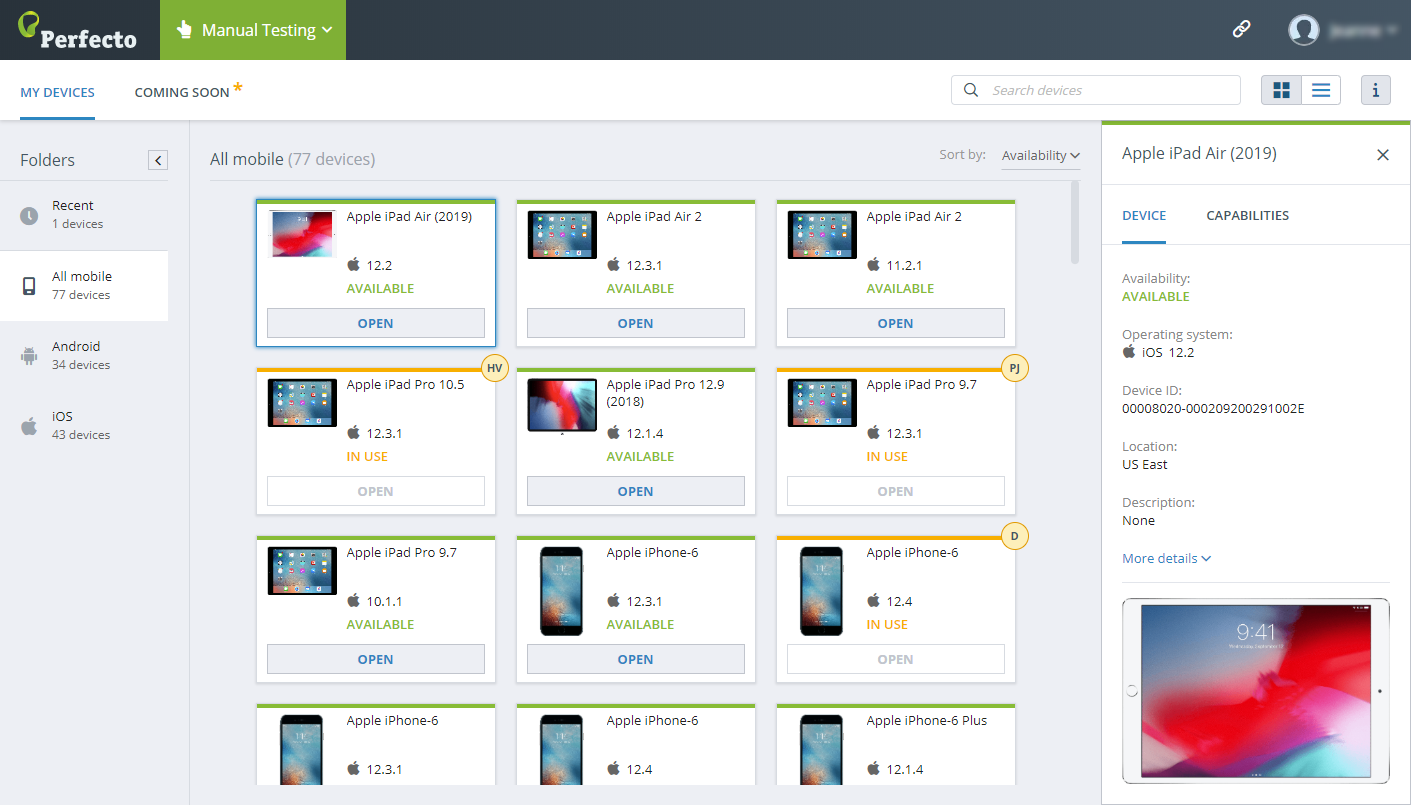
You now have more options for Sort by and Filters when selecting a device in Manual Testing. These improvements make it easier to quickly find the right device for your testing needs.
-
Sort by options: Availability, Device model, Operating system, Device audio, Accessibility, Device SIM, Location, and Used by
-
Filter options:
-
Availability: Available, In use, In error, Offline, and Maintenance.
-
Accessibility: Only devices that support accessibility testing.
-
Sort by options are available only in tiles view and in all folders except for Recent.
To learn more, see Select a device for manual testing.
Change to accessing devices with Accessibility enabled
The Open in accessibility mode toggle has moved to the Filters drop-down list.
To select devices with accessibility enabled, open Filters and select Accessibility. The devices list is filtered accordingly, and you can select a device as usual.
Accessibility testing behavior is unchanged.
To learn more, see Select a device for manual testing and Test accessibility with VoiceOver or TalkBack.
Assets and setup enhancements
In this release, the Assets and setup view includes the following enhancements.
Changes to repository download behavior
Perfecto is changing the default behavior for downloading files from the repository to improve data security:
-
New customers: Downloading files from the Perfecto repository is disabled by default. You can upload files, but downloads are not available unless explicitly enabled for your cloud.
-
Existing customers: Downloads are currently enabled by default. This will change on April 1, 2026.
Starting April 1, 2026, downloading files from the repository will be disabled by default for all clouds. A cloud must explicitly allow repository downloads.
If your workflows require download access, contact Perfecto Support to keep repository downloads enabled.
Uploads are not affected by this change and remain available regardless of download access.
To learn more, see Test asset management.
REST API enhancements
In this release, the Perfecto REST API includes the following enhancements.
New API endpoint: Get test script as Appium
A new public API endpoint lets you export a AI Scriptless test as an Appium script. You can use this endpoint to download the test in JavaScript format and execute it locally using Appium.
To learn more, see Download test as Appium JavaScript.
EOL notice: Android 8 and 9
Android 8 and 9 will reach End of Life (EOL) on March 29, 2026. After this date, devices running Android 8 and 9 will no longer be supported in Perfecto.
To learn more, see Suspension of support policy | Mobile device OS.
Appium 1 deprecation and migration timeline
Perfecto has updated the Appium 1 end-of-life timeline to provide an extended grace period for migration. Following is the revised plan.
Key dates
-
December 21, 2025 – Appium 1 deprecated (end of support)
-
Appium 1 no longer receives regular support.
-
Support team is limited to migration activities, not standard execution issues.
-
Appium 1 executions continue to run temporarily, but migration should remain a priority.
-
-
January 13, 2026 – Appium 1 end of life
-
Appium 1 is disabled for all customers except those granted an extension.
-
Customers requiring an extension must coordinate with Perfecto Support.
-
-
March 1, 2026 – Appium 2.19 set as default
-
Appium 2.19 becomes the default execution engine.
-
Appium 1 executions require explicit enablement via the
appiumVersioncapability.
-
What you need to do
-
Begin migrating your scripts to Appium 2 as soon as possible.
-
Use Appium 2-compatible client libraries:
-
Java: 8+
-
Python: 2+
-
.NET: 5+
-
WebdriverIO: 7+
-
-
For migration guidelines, see:
For assistance with migration activities, contact Perfecto Support.
Framework support
This release introduces the following test framework enhancements.
Quantum 3.1.9
Quantum 3.1.9 is now available. This release resolves multiple dependency-related security vulnerabilities and includes bug fixes for driver capabilities, framework version configuration, and Log4j. It also introduces support for a global data provider configuration, allowing the data provider to be defined either in the feature file or globally via the global.dataprovider property.
Before upgrading, ensure compatibility with changes introduced in version 3.0.0.
To learn more, see Quantum 3.1.9 release notes.
Platform support | Real devices
This release introduces the following enhancements and updates to real device support.
New iOS versions
You can now test your applications on real devices running the following iOS versions:
-
26.4 Beta 2 and 26.3 GA
Devices running an iOS 26.0 version require a cloud with HSS 2.0 and macOS Sequoia. If you are interested in having iOS 26.0 devices connected in your cloud, contact Perfecto Support.
Requirement: To use
driver.get()on iOS 26.4 Beta 2 and later, you must use Appium 2.19.0 or newer. Earlier Appium versions are not supported. -
16.7.14 GA
Versions 16.7.8 GA and later are only intended for older devices that do not support iOS 17.
For complete support information, see iOS support updates.


macOS Tahoe in public cloud
Machines running macOS Tahoe are now available in Perfecto's public cloud, allowing you to test and validate your applications on the latest macOS version.
For complete support information, see Supported platforms.

New Android versions
You can now test your applications on mobile devices running Android 17 Beta 2.
If you are interested in having Android 17 devices connected in your cloud, contact Perfecto Support.
For complete support information, see Android support updates.

Platform support | Virtual devices
This release introduces the following enhancements and updates to virtual device support.
Change to default Appium version for virtual devices
The default Appium version for virtual devices has been updated to Appium 2.19.
For complete support information, see Supported platforms.
New iOS versions
You can now test your applications on virtual devices (simulators) running iOS 26.4 Beta 2. This version is supported in all regions with limited capacity.
The following limitation applies to iOS 26.4 Beta virtual devices:
-
Applications compiled exclusively for Intel (x86_64) cannot run. An ARM64 build is required.
For an updated list of devices and versions, see Supported simulator devices and OS versions.
New Android versions
You can now test your applications on virtual devices (emulators) running Android 17 Beta 2. This version is supported in all regions and at full capacity.
The following limitations apply to Android 17 Beta 2 virtual devices:
-
Chrome does not function properly (same behavior as on Android 16 virtual devices).
-
Devices can start more slowly than earlier Android versions.
For an updated list of devices and versions, see Supported emulator devices and OS versions.
Android 16 support on Samsung emulators
Perfecto now provides full support for Android 16 on Samsung virtual devices. Until now, Android 16 was available only on Google Pixel 6 and later virtual devices.
In addition, starting now, every new Android version will be supported across all emulator types, including both Google Pixel and Samsung virtual devices. Previously, new Android versions were supported only on Google Pixel models.
This enhancement gives you broader test coverage immediately on Android 16 and ensures consistent support across all emulator types for future Android versions.
For an updated list of devices and versions, see Supported emulator devices and OS versions.
Expanded Android version support across emulator types
Starting with this release, every new Android version will be supported across all emulator types, including Google Pixel and Samsung virtual devices. Previously, new Android versions were supported only on Google Pixel models.
Browser support
You can now test your applications in the following new browser versions on Windows and Mac machines:
-
Google Chrome 145 Stable and 146 beta
-
Firefox 148 Stable and 149 Beta
-
Microsoft Edge 145 Stable
For a complete list of supported browsers, see Supported platforms.


